Happiness Comes in Waves
Introducing a brand new way to share that requires reciprocity to help deepen your relationships. Plus, it's just more fun.

What makes social features on Happyfeed unique relative to other apps is that they build on top of a library of meaningful, positive memories – exactly the sort of things many of us like to share. But the social features themselves are similar to what you’d see elsewhere. We’ve added reactions, commenting, profiles, and there are plenty of requests for liking comments, commenting on comments, tagging in comments. Anything to be on par with Instagram, WhatsApp, Snapchat, etc.
Rather than continuing to compete directly as an “Instagram for Positivity,” we want to introduce features that fit our core values and nudge our users toward more joy and deeper relationships. So instead of cramming familiar features into our little app, we’re trying something new.
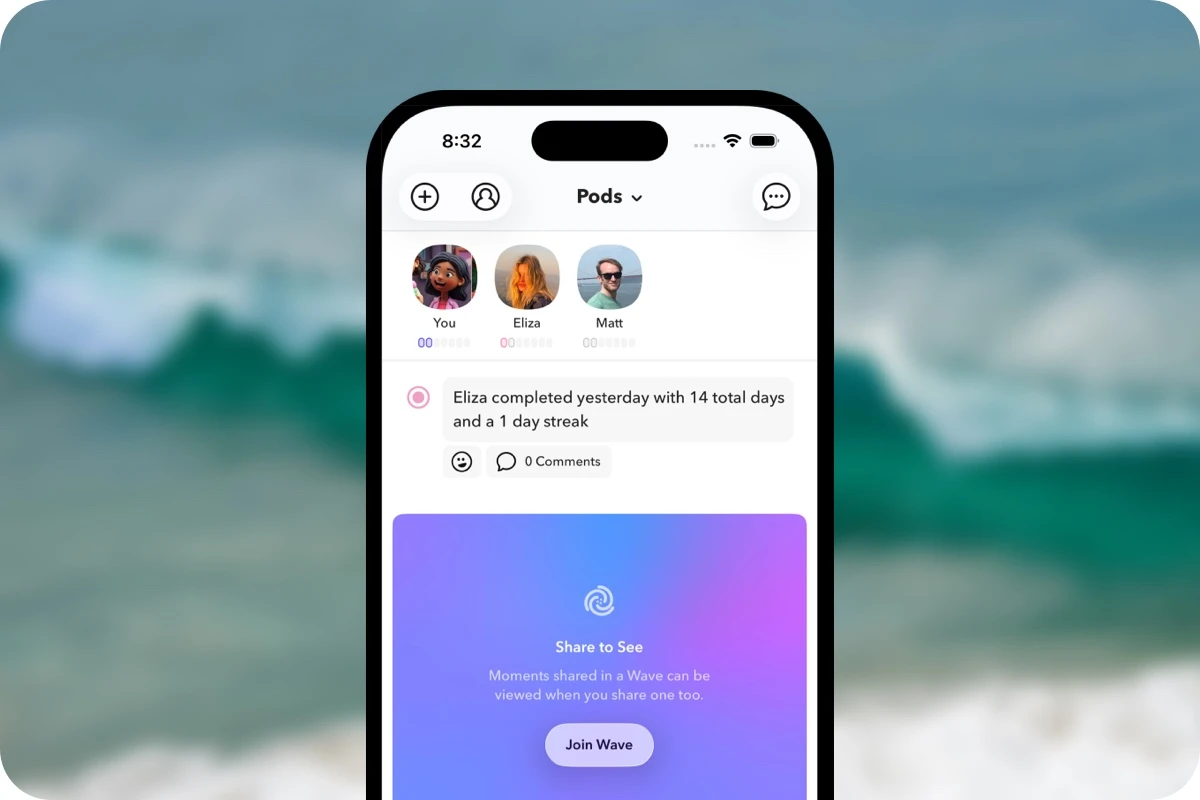
Today, Waves are now live on Happyfeed for iOS. A Wave is a group of shared memories within a Pod that can only be seen by members who join by adding a memory of their own.
A Quick Example
Let’s say you have a Pod with your mother and sister where you share often but they seldom do. Maybe they aren’t as active on Happyfeed. How do you encourage them to share glimpses of their lives? By sending a memory in Wave Mode, they’ll be required to join by sharing before they can see what you shared.
Sharing is a vulnerable act and guaranteed reciprocity can make it feel more natural.
Everyone is rewarded: you get to see their memories and they can see a rare memory from each other. Waves are designed to deepen relationships in a way that feels like a game. You might imagine a scenario where Waves function as daily check-ins or a prompt for hobby-specific groups, like baking.
How Sharing in Waves Works
The core idea behind Waves is this: to see memories shared in a Wave, you first need to share a memory yourself. Everyone who joins can see what everyone else has added. The best way to sum this up is share-to-see.
Here are a few helpful rules on how Waves function:
- When creating a moment, you can choose to share with specific Pods in Wave Mode. This will allow you to create a new Wave or join an existing one that a friend may have started.
- Memories shared to waves must have photos or video, to make it more interesting for everyone.
- Waves appear in your feed blurred out with a prompt to join. You can quickly select from recent moments or daily throwbacks to simplify joining.
- Everyone who has joined a Wave is able to view all other memories shared so far. Since Waves are per Pod, only people in your Pods can see your memories (no strangers).
- Memories can be added to any or all of your Pods in Wave Mode. With a single memory you could trigger one or all of your Pods to share back with you.
- There’s no limit on how many Waves you can create or join each day, but you can only assign individual memories to one Wave per Pod. E.g. if you are in 4 Pods, each memory can be in up to 4 Waves.
Next, let's dive into how you can create a new Wave or join an existing one. Both methods fit into your current habits using Happyfeed.
How to Create a Wave
Creating a Wave builds on the existing way to share a moment to your Pods. There’s just one extra step, and we might even create default settings to change that in the future.
- Start by adding a moment to Happyfeed. Tap the “+” button on the main screen to open the moment composer. If you’re in any Pods, you’ll see them across the bottom.
- Tap the 🌀 button in the bottom left corner to open the sharing pop-up. You’ll see your Pods listed here as buttons or an option to create a Pod if you aren’t in any.
- Tap on the “Pods Mode” dropdown on top to open sharing modes. From there, you’ll select “Waves Mode” and return to the picker. Now when you select a Pod, it’ll show as creating a new Wave.
- When you’re done, tap the main “Update” button. That’ll save your options and apply them when you save the completed memory. Sharing to Waves requires photos or video, so be sure to add one.
The same flow works on existing memories as well. You can open the memory by tapping it and then use the 🌀 button to update how it is shared, if at all. When editing an existing memory, tapping the “Update” button in the pop-up will apply the sharing right away.
How to Join a Wave
There are two ways to join a Wave – (1) by responding to a hidden moment in your feed or (2) when adding a new memory to Happyfeed. You can think of them as reactive and proactive approaches to sharing.

Joining from your Pods feed
Moments shared in Waves will appear in your feed as a blurry blue and violet block describing that the moment is hidden until you share back. Doing so is easy:
- First off, enjoy the subtle motion of the background colors - that was fun to build!
- Tap the “Join Wave” button to open a screen that fetches your latest memories and all your throwbacks from the day. You can toggle between them with a selector on top.
- Select a memory to open a confirmation page. This will allow you to see the photos better or play the video if there is one.
- The memory could’ve been shared in multiple Waves across your mutual Pods, so you’ll see toggle buttons to pick the ones you want your selection to go to. Full transparency.
- Once you confirm, a new view will appear showing all the memories in the Wave. You can go back to this screen by tapping the Wave icon in the top right corner of individual shares.
Something fun we also added: now you’ll see a “1 Year Ago” (or similar) tag on shared throwbacks. It’s an easy way for your friends to recognize past posts versus recent ones.
Adding a new memory to an existing Wave
Maybe you prefer to add fresh content to a Wave. You’ll have a couple of options:
- Any Pods with “fresh” Waves will appear with a little purple indicator on the bottom controls in the moment uploader. By tapping on an individual Pod, you’ll see options to share normally or select from Waves to join. Selecting the Waves option opens a pop-up showing a list to choose from.
- You can also follow the steps for creating a new Wave, but if a Pod has existing Waves, it’ll open a list of options instead of immediately toggling on.

Waves Offer a Better Sharing Model
With Waves, you hold a little extra power as the sharer. When everyone has to opt-in, it’s more about checking in, sending any small thing just to show appreciation to the other sharers.
Maybe you like to keep gratitude and social separate, but I’d argue there’s never been a more aligned place to combine them. When sharing is treated as a mutual act, it’s less about showing off and more about contributing.
Use Waves as an excuse to try Pods
If you’re in a Pod, try sending your next share as a Wave, and if you’re a private gratitude journalist, maybe try creating a Pod with a close friend or family member.
There are plenty of other great reasons to test out sharing on Happyfeed. Our Memories Widget, launched last year, is a fun way to see shared memories right from your iPhone Home Screen.
With Waves, you have a new tool at your fingertips. It’s a way to nudge participation in a shy or reluctant group or start a ritual your friends may grow to love.
Help us improve Waves
Since Waves are such a new and novel way to share, we are expecting a lot of feedback from this launch. Reach out if you think anything is missing or just doesn’t make sense. A flow could feel funky or a button out-of-place. Even better, if you have an idea for a new feature, let us know!
You can get in touch anytime by messaging [email protected].
Philosophy & Motivations
I’ve always had a nagging question in the back of my mind:
Why would someone share on Happyfeed when they could just screenshot or copy their posts and share elsewhere, like iMessage?
For a long time, I couldn’t really answer the question. “It’s connected to your journal” or “it encourages smaller, more intimate groups” but the app didn’t have a clearly defined why behind sharing.
Sharing to a Wave says, “I’m sharing an important memory with you, and I’d love to see one in return.” As more people opt in, the Wave grows and everyone sees more value. It’s a rare win-win(-win)^n.
With new ways to share like Waves, Happyfeed is becoming a more compelling place to bring your friends. Pods aren’t just a pared-down version of Messages or Instagram, they can actually deepen relationships by encouraging more meaningful sharing of real moments.
Note on Private Memories
Lastly, I want to emphasize that although I’m thrilled about Waves, they will not be for everyone, and Happyfeed is first and foremost about private reflection. That fact will never change. If you currently use Happyfeed as a personal journal, it’ll never need to be anything more than that.
✌️
January 27, 2026


Shared Photos Widget for Couples and Friends
Flip through shared photos from your groups with our new interactive widget. Connect with your friends, right on your home screen.

Delete Social Media
The case for dropping out of Instagram and other apps that no longer serve their original purposes.
Weekly Photo Tracker
Keep track of your journaling goals with weekly summaries displaying picture tiles. Zoom out on your life… but just a little.