
A Better Way to Share Memories
Pods are a core part of what makes our app unique - combining daily reflection with selective sharing. Now sharing is easier than ever.

Pods are a perfect alternative to social media - small, private groups with only your favorite people. They’re a place to share real memories straight from your daily photos and journaling. Over the past year, Pods have been growing in popularity and we want to provide a better experience with more reasons to join one.
Starting with iOS, today we’re launching a redesigned sharing experience for Pods. These changes are based on the feedback and frustrations we’ve heard from members (and often experienced ourselves). There are three primary focuses for the update:
- Making it as simple as possible to share to Pods.
- Clarifying the “Broadcast” option and making room for new ideas.
- Improving the performance of loading the Pods screen.
It’s challenging to make a complicated feature feel simple, but I’m confident that this is a serious step in the right direction. Stay tuned for more changes this month - improved invites, more design updates, and a whole new way to share.
1. Sharing Should Be Simple
Since releasing Pods in 2020, we’ve been slowly adding new features piece-by-piece. First, you could only share progress and streaks, then we added actual memories sharing, then broadcasting and followers, finally the latest design with commenting. Each of these additions made the product richer but more complicated. The whole goal our the app is to help you stick with a simple habit so it was time to make changes.
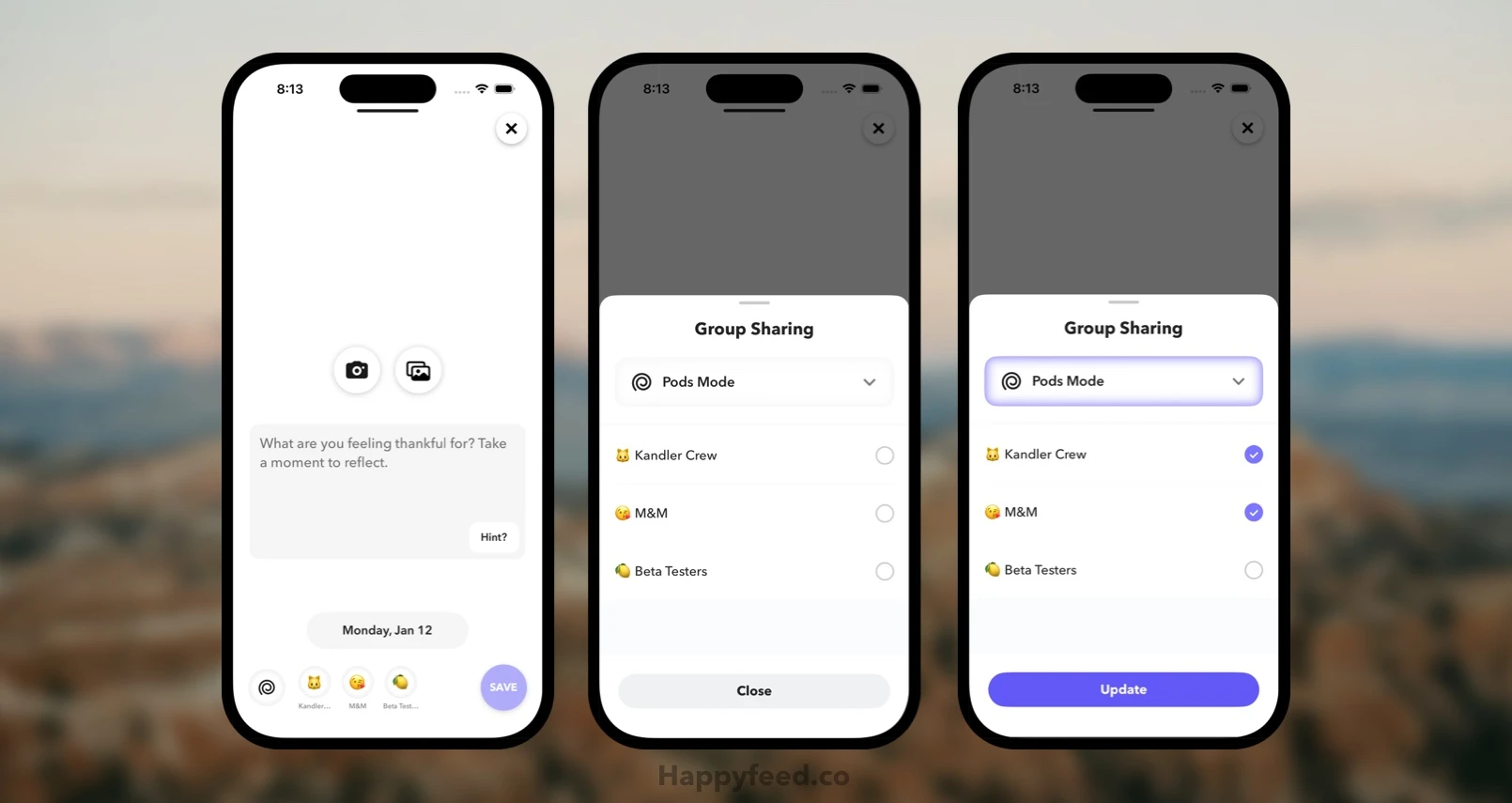
The interface changes come in two pieces: (1) a new quick sharing UI on the moment uploading screen, and (2) a new sharing popup for selecting Pods. I’ll break down the updates here:
Quick-Pick Sharing UI
When uploading new moments, or viewing past ones, you’ll notice a new set of buttons for controlling sharing.
- A new set of quick-pick buttons appear next to the main 🌀 button now. You can tap them to easily toggle sharing to a Pod.
- The old “tips” and close buttons are moved to the text box and top corner, respectively to make extra space.
- For existing moments, you’ll only see the 🌀 button to make room for standard sharing and other controls.
- You can still tap the 🌀 without editing the moment to adjust sharing after uploading
New Sharing Popup
The old Pod sharing popup was becoming cluttered so it’s been totally redesigned. It’s familiar but much simpler to use.
- Sharing is split into two distinct modes now: Pods Mode and Broadcast. In Pods Mode, you select specific Pods to share with and in Broadcast mode, moments are shared widely with all Pods and followers.
- Modes can be selected with a new selector button, and Broadcasting has it’s our view with more information (see below)
- Pods selections in the popup sync with the quick view - select or deselect in either and both will update. Making it very clear exactly how a memory will be shared.
- As always, you can long-press any of the Pods to enable or disable auto-sharing for that Pod.
More clarity, less taps, and a cleaner design. I’d love feedback on what you think about the changes and how they could be even better.
2. Broadcasting Gets Some Clarity
Sharing in Pods isn’t enough for some of our biggest moments. Graduation, marriage, an announcement, a once-in-a-lifetime trip. These things are best shared widely. It’s fun to see the reactions from all of our friends and family. So, you might post them to Instagram instead of Happyfeed.
Broadcasting is our answer to “this post should be shared with everyone I’m connected with.” It’s for the memories that are worth a real shout-out. Though, this wasn’t especially easy to understand in the old interface. Was it different from Pods? (Kind of.) Was it going to share the post publicly somewhere? (No, absolutely not.)
Happyfeed enables connecting through either Pods and followers, with overlap encouraged. You can follow friends directly (with approval) by scanning a QR code on their profile. Memories shared via the “Broadcast” option can be seen by both all your Pods and all your followers. Typically, you might mostly share in your Pods but occasionally send something to your full list of friends / followers.
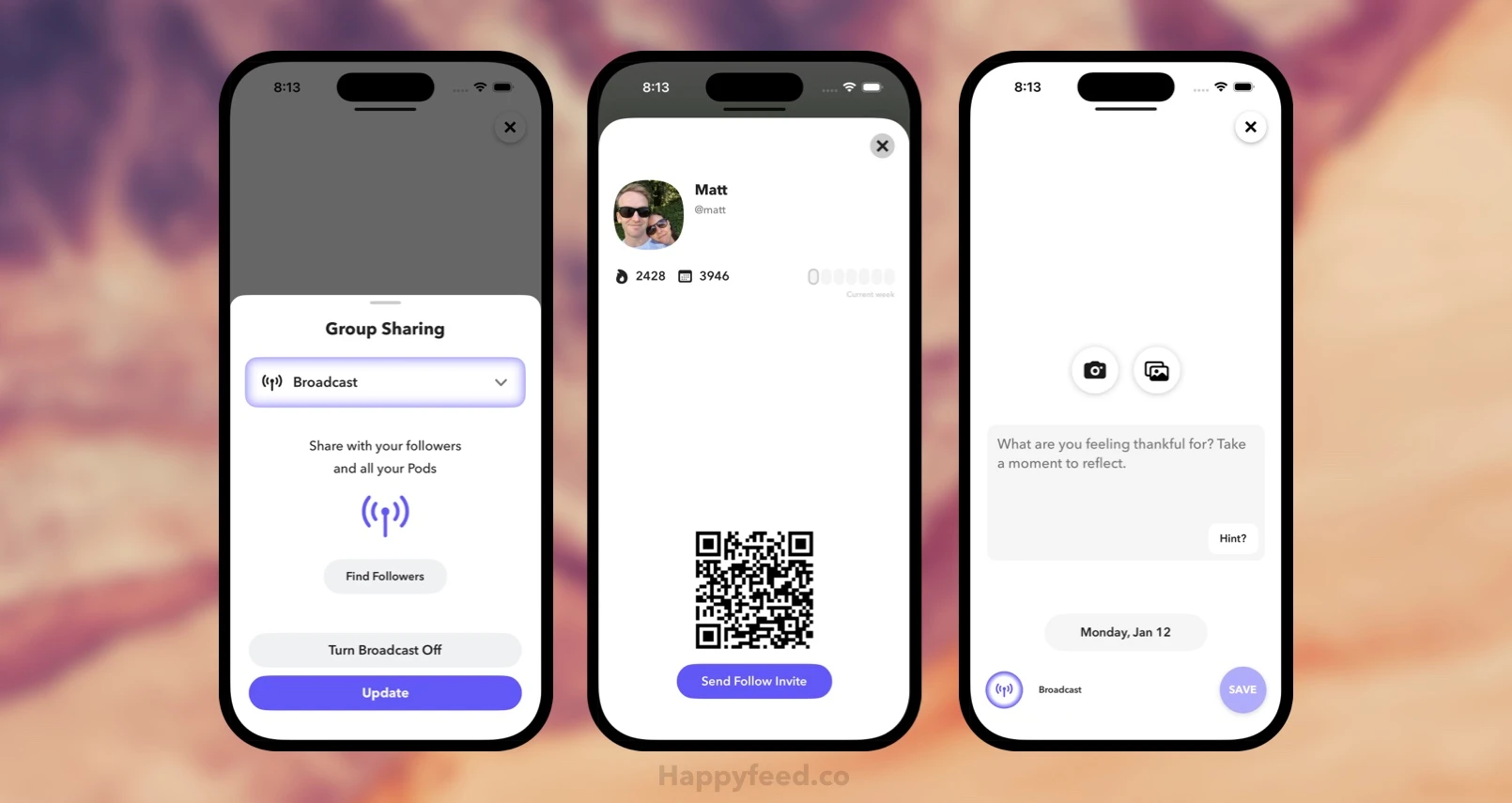
Now Broadcasting is treated as a totally separate option from “Pods Mode,” because it is a totally different approach to sharing: “everyone I care about should see this” versus “this is meant for a specific group.”
3. Improving Foundations
The majority of the work in this update isn’t in the new interfaces, it’s in the way the app is now handling data. We’ve rebuilt the way the data is structured and how the interface manages it from our API. Most notably, this speeds up the time to load shared memories on the Pods screen. But these changes also create opportunities for more advanced features.
This will eventually enable things like: Posting to Pods even offline so it syncs when you’re back on the grid. Ways to mix shared posts into your throwbacks and recaps. Introducing entirely new modes for sharing memories.
Over the past few years, we’ve been gathering all sorts of useful feedback on how to improve Pods, and hopefully this is the foundation for turning it into a more intuitive, full-featured, and delightful sharing experience.
“New Ideas” and Future Work
If you’ve read this far, you’ve probably caught on that there might be another big release coming soon. Rather than tease it out anymore, I’ll just give you a timeline: Come back in two weeks and you’ll see.
In the meantime, sharing with your friends in Happyfeed is better than ever. If you’ve been solo journaling or have never tried the app, now is a great time to try it out. It doesn’t have to be January 1st to start a positive habit.
Thanks for following along!
Two weeks update: Check out our new way to share Waves 🌊
January 13, 2026


Happiness Comes in Waves
Introducing a brand new way to share that requires reciprocity to help deepen your relationships. Plus, it's just more fun.

Delete Social Media
The case for dropping out of Instagram and other apps that no longer serve their original purposes.

Private Instagram Alternative
How a group photo sharing app based on journaling can be used as a private social network